
AI animation in 2026 has a different problem than it did two years ago. Back then, the question was whether AI could realistically animate anything at all. That debate is settled. Today, every creator, marketer, and filmmaker is asking a more practical version of the question: out of dozens of capable AI animation tools, which AI video model should I actually use for this specific task?
Motion control, character animation, image to video AI generation, and cinematic physics simulation have all crossed the production-ready line. But they crossed it in different models, each built on different architectures and optimized for different outputs. The AI animation tools landscape has matured into a set of specialists, and the creators producing the best AI animation videos in 2026 are the ones who understand what each one does well, not just what it can do in a polished demo.
This guide walks through the strongest AI motion control models, AI character animation tools, and cinematic AI video generators available right now, and helps you match the right tool to the right job. We start with the platform that's quickly becoming the default for creators who want production-grade motion transfer without juggling subscriptions.
What Is AI Motion Control and Why Does It Matter?
Traditional character animation relied on two slow, expensive methods. Keyframing required animators to set a character's pose at specific frames and let software interpolate the movement in between. Motion capture required a performer to wear tracking sensors in a controlled studio environment, with significant post-processing afterward. Both worked, but both gated animation behind serious time, budget, or technical investment.
AI motion control replaces that workflow with a single input: a reference video. You upload a short clip of a person dancing, walking, gesturing, or performing, and the AI extracts the motion from the reference video and transfers it onto your character image. The character moves with the timing, weight, micro-expressions, and physicality of the person in the reference clip, with no manual keyframing or hardware required. This is what makes AI motion control the most disruptive shift in character animation since the introduction of digital tweening, and why every serious creator workflow in 2026 is built around an AI animation video generator at its core.
Best AI Motion Control Models in 2026
1. Templix AI Motion Control (Powered by Kling 3.0 Pro)
Templix Motion Control is the easiest production-ready entry point into AI motion control in 2026, and it's quickly becoming the default Kling motion control tool for creators who want cinema-quality character animation without the workflow complexity of stitching multiple AI animation tools together. Powered by Kling 3.0 Pro under the hood, Templix delivers the same motion fidelity, identity consistency, and smooth motion transfer AI quality that defines the top of the market, packaged inside a workflow built specifically for short-form content creators, marketers, and AI influencer accounts.
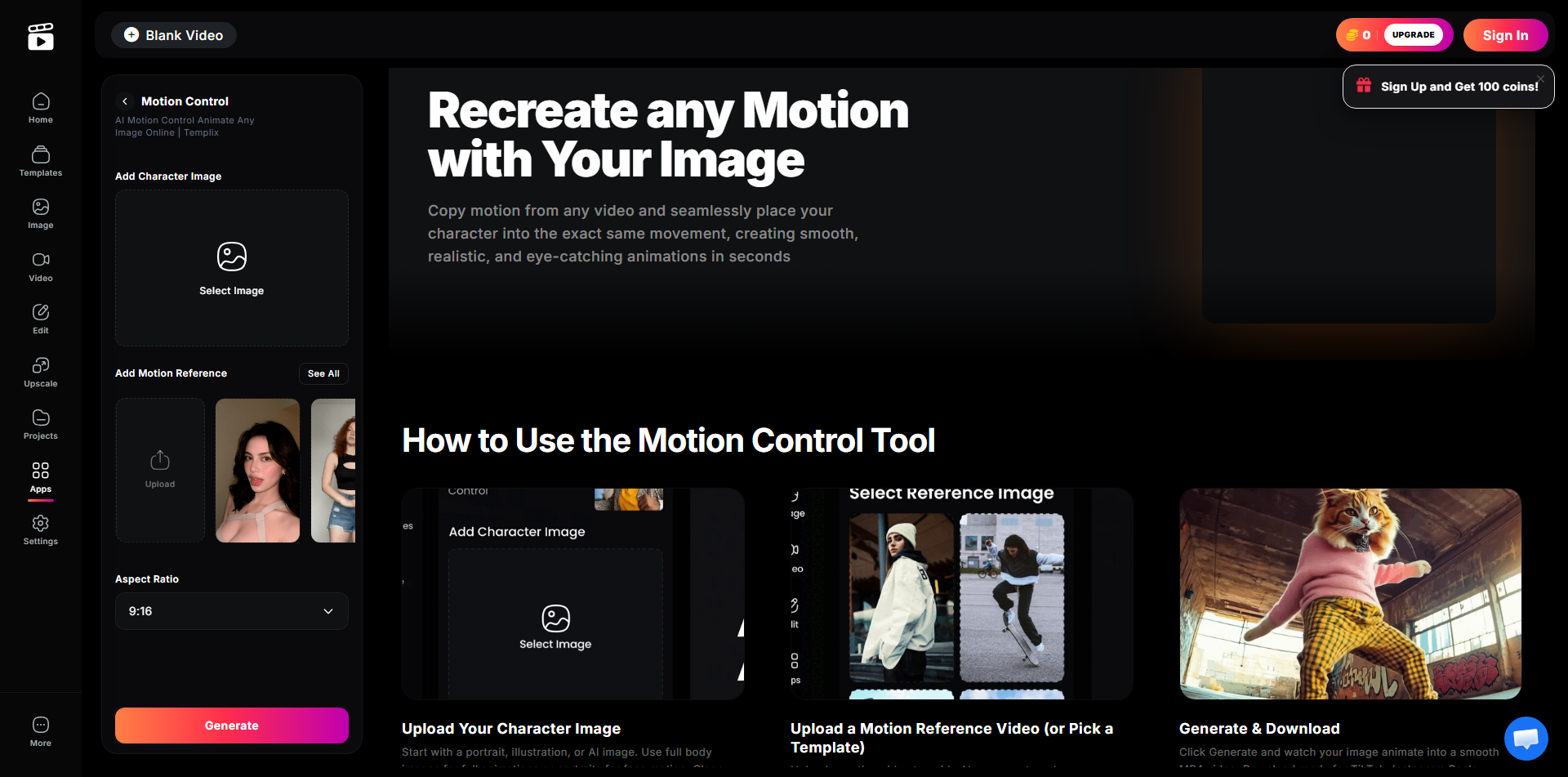
The Templix workflow is intentionally simple. Upload a character image, which can be a portrait, an illustration, an AI-generated render, or a full-body shot. Choose a motion reference, either by uploading a video clip you want the character to mimic or by selecting one of Templix's built-in motion templates covering dance moves, runway walks, sports gestures, and viral trend animations. Add an optional style prompt for cinematic tone, anime aesthetic, or custom looks. Click generate. In under a minute, you get a smooth MP4 video of your character performing the exact motion, rendered in 9:16 and ready for TikTok, Instagram Reels, YouTube Shorts, or paid ad campaigns.
What sets Templix apart in the AI character animation category is the motion template library. Most motion control tools force you to source your own reference clips, which is a serious bottleneck if you're producing volume content. Templix ships with a curated library of dance, runway, and sports motion presets, which means you can animate a character into a viral trend without ever leaving the platform or filming anything yourself. For creators producing daily Reels, AI UGC, or AI influencer content, this single feature is the difference between manageable production and constant friction.
Templix also handles the parts of the workflow that other tools push back onto the user. Aspect ratios are preset for short-form social. The MP4 export is platform-ready out of the box. The Kling 3.0 Pro backbone preserves character identity across the generation, so your character keeps the same face, the same outfit, and the same visual style from start to end.
Best for: Content creators, AI influencer accounts, brand marketers, meme makers, and agencies producing high-volume short-form animation across TikTok, Reels, and Shorts.
2. Kling 3.0
Kling 3.0 on Templix AI
Kling 3.0 is the current benchmark for raw AI motion control quality and the model that powers Templix's animation engine. Released in early 2026 as part of Kuaishou's unified Video 3.0 architecture, it represents the biggest capability leap in the Kling family since the model first launched. The headline upgrade is element binding, which maintains facial and character consistency across multi-shot sequences by allowing creators to anchor a character to multiple close-up references and short clips. Earlier motion control models struggled to keep a character looking like themselves across cuts. Kling 3.0 locks in visual identity and carries it through every frame.
Full-body movement stability, hand gesture accuracy, and camera synchronization are all noticeably better than in earlier versions. The model also interprets cinematic camera language with real accuracy. Specify a dolly zoom, a Hitchcock-style focal length change, or a slow aerial pull-back, and Kling 3.0 executes it correctly rather than approximately. For filmmakers and agencies producing narrative content with multi-shot continuity, this is the AI video model that finally feels like a real production tool.
Try Templix Motion Control free
3. Runway Gen-4.5 with Act-Two
Runway Gen-4.5 currently sits at the top of the Artificial Analysis text-to-video leaderboard, and it earned that position through a combination of motion quality, creative control, and output flexibility that no other commercial AI video generator currently matches. The architecture supports controllable camera paths, multi-motion brushes for directing independent movement on different parts of an image, native lip sync, and the Act-Two performance capture system.
Act-Two is the standout feature. It brings professional motion capture to anyone with a smartphone. Upload a driving performance video, which can be a facial expression, a body performance, or a speech delivery filmed on any camera, and pair it with a character reference image. Act-Two transfers the movement with impressive fidelity, capturing not just gross body motion but the subtler elements: the slight lean during emphasis, the eye movement between points, the micro-expressions that separate a believable AI character animation from an obviously generated one.
Gen-4.5 also leads on realistic object motion, including weight, inertia, fluid dynamics, cloth simulation, and physically plausible collisions. For production agencies, VFX teams, and brand creators who need precise directorial control, Runway Gen-4.5 is the professional-tier choice.
Best Cinematic AI Video Generators in 2026
These models aren't motion control tools in the reference-transfer sense. They're physics simulators and cinematic generators. They excel at making AI-generated scenes look filmed rather than rendered, which matters most for creators who need maximum visual realism over maximum motion directability.
4. OpenAI Sora 2 Pro
Templix AI Sora 2 app dashboard
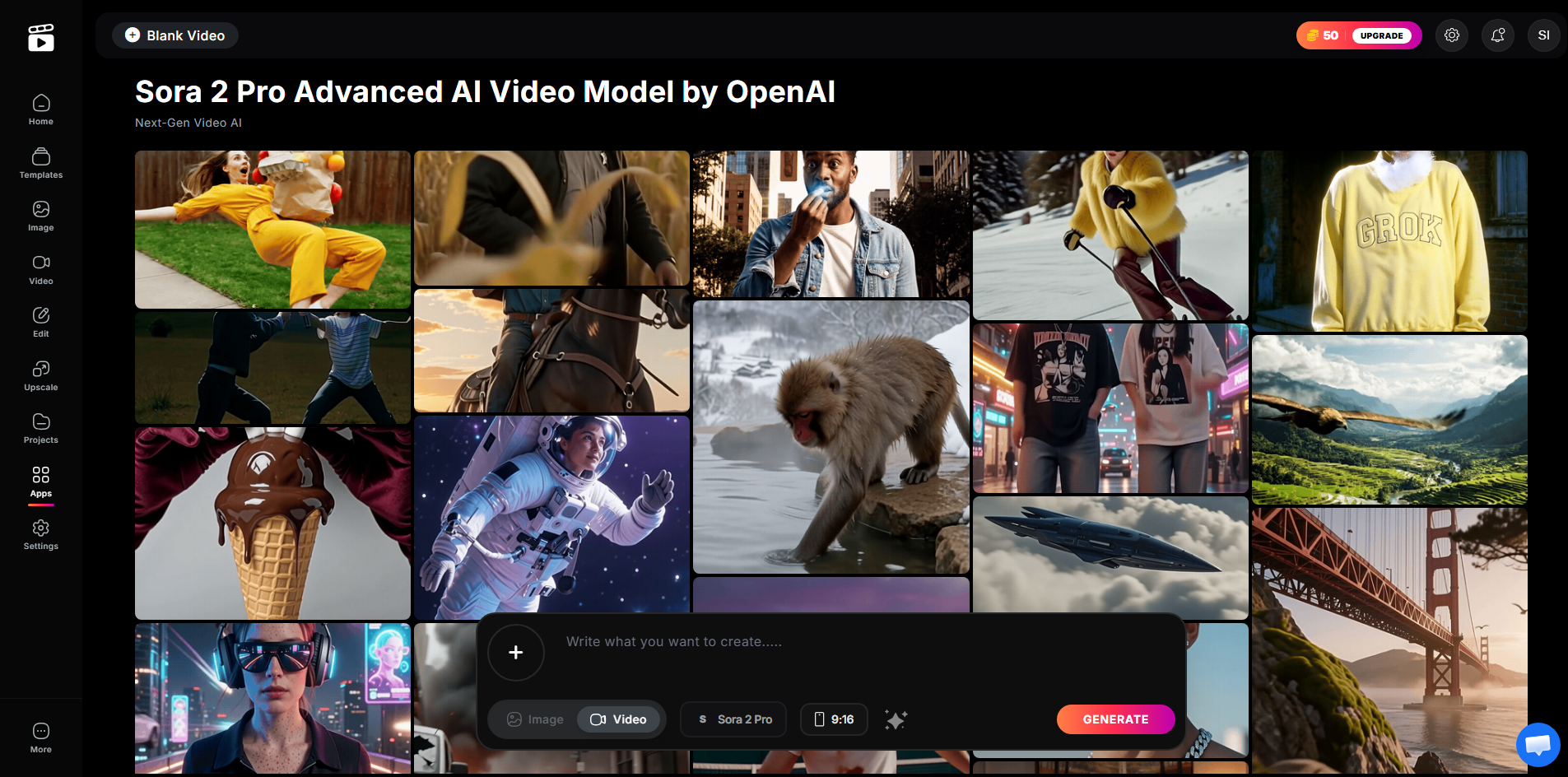
Sora 2 Pro is the most physically accurate AI video model currently available. Where most AI video generators still struggle with the implicit rules that govern how objects behave, like what happens when a glass falls or how water moves around an obstacle, Sora 2 demonstrates a genuine understanding of cause-and-effect relationships.
Sora 2 also leads on native synchronized audio, generating dialogue, ambient sound, footsteps, and environmental audio inside the video itself rather than as a separate post-production layer. Combined with strong character consistency across multiple camera cuts and clip lengths up to twenty seconds, Sora 2 Pro is the strongest tool for cinematic storytelling that requires maximum realism. The trade-off is access cost: Sora 2 Pro requires a premium subscription, which limits it for creators focused on social content volume.
5. Google Veo 3.1
Google Veo 3.1 sits next to Sora 2 in the cinematic tier but takes a different approach. Where Sora 2 prioritizes physical accuracy, Veo 3.1 excels at mood, aesthetic, and the kind of beautifully art-directed visual output that defines high-production-value brand content. Native 4K output and vertical video support make it uniquely suited for YouTube Shorts and Reels at the highest resolution tier.
Veo 3.1's Ingredients to Video feature allows up to four reference images per generation, giving precise control over subjects, styles, and compositional elements that text prompts alone cannot deliver. It also leads every model on this list for native audio generation. For audio-forward formats like documentary-style videos, narrated explainers, and brand films with dialogue, Veo 3.1 is the current best AI video generator.
Best AI Character Animation Tools for Social Content
Character animation tools optimize for speed, volume, and accessible creative production. The goal is compelling, scroll-stopping character-driven content rather than feature-film realism.
6. Pika 2.5
Pika 2.5 is the point at which Pika stopped being a clip generator and became a production environment. The Pika 2.5 Studio introduces a timeline and layer-based editing interface, which means creators can build multi-shot character sequences inside the platform rather than generating clips individually and assembling them in a separate editor.
Pikaswaps enables subject replacement inside existing video, and the expanded Pikaffects library adds physics-driven transformations like explosions, melting, deflation, squishing, and material changes that produce the kind of visually surprising content that stops a scroll on Reels and TikTok. At a low monthly entry price, Pika 2.5 is the most affordable timeline-based AI character animation workflow on this list, making it a strong pick for social creators who need volume and speed without a production budget.
7. Pika 2.2
Pika 2.2 is where the Pika family found its social media footing. The introduction of Pikaframes, a keyframe transition system, smoothed out the clip-to-clip inconsistency that limited earlier outputs. The Pikaffects library, with its physics-driven transformation effects, gives Pika 2.2 a creative lane that no other model on this list occupies, particularly for meme content and viral visual storytelling.
Best Open-Source AI Animation Model
8. Wan 2.2
Wan 2.2 is the most capable open-source AI video generator available in 2026. Released by Alibaba's Wan-AI team under an Apache 2.0 license that permits free use, modification, and commercial distribution, it handles both text-to-video and image-to-video AI generation with motion coherence and temporal consistency that rivals mid-tier commercial models.
What Wan 2.2 offers that no commercial tool can is complete control. No content moderation API, no rate limits, no per-generation cost at scale, no dependency on a third-party platform's uptime or pricing decisions. For developers building custom AI animation pipelines, studios handling sensitive client content, and researchers running experiments at volume, those properties are the reason the tool exists.
Which AI Motion Control or AI Animation Tool Should You Use?
The right model depends on three questions: what are you making, how fast do you need it, and how much technical setup are you willing to manage? Here's a direct decision guide based on those three variables.
For the best balance of motion control quality, ease of use, and short-form content speed, use Templix Motion Control. For raw cinematic narrative production with full multi-shot control, use Kling 3.0 directly or Runway Gen-4.5 with Act-Two. For maximum physical realism and integrated audio, use Sora 2 Pro or Google Veo 3.1. For social character animation with timeline editing, use Pika 2.5. For full local control with a commercial license, use Wan 2.2.
The serious creators producing the best AI animation video in 2026 are not picking one model. They're running multi-model workflows: Templix or Kling for motion transfer, Sora or Veo for cinematic scenes, Pika for character moments, and open-source tools for prototyping. Understanding what each AI video model does best is what makes that orchestration work.
Ready to Create AI Animation Video?
The AI animation tools landscape in 2026 is defined by specialization. No single AI video generator wins every category. What the field has produced instead is a set of best-in-class models, each optimized for a specific dimension of the problem.
If you're producing short-form content, AI influencer videos, viral animations, or brand campaigns for TikTok, Reels, and Shorts Templix AI Motion Control is the fastest path from idea to finished video. Powered by Kling 3.0 Pro, packed with motion templates, and built around a workflow that gets out of your way, it's the AI motion control tool creators are switching to in 2026.
Frequently Asked Questions
What is the best AI motion control tool in 2026?
Templix AI Motion Control, powered by Kling 3.0 Pro, is the best AI motion control tool for short-form content creators because it combines top-tier motion transfer quality with a built-in template library and a workflow optimized for TikTok, Reels, and Shorts. For multi-shot narrative production with manual control, Kling 3.0 directly and Runway Gen-4.5 with Act-Two are the strongest professional alternatives.
What is the difference between AI motion control and AI video generation?
AI motion control transfers movement from a reference video onto a character image, so your character performs the exact motion of the source. AI video generation creates a video from scratch using a text prompt or seed image, without a motion reference. Motion control gives you specific, controllable movement. Video generation gives you flexible scene creation.
Can I animate any character image with AI motion control?
Yes. Templix Motion Control works with portraits, full-body shots, illustrations, anime characters, and AI-generated renders. Clean backgrounds and well-lit reference images produce the best results, but the tool handles a wide range of character styles automatically.
Do I need animation experience to use AI motion control tools?
No. Tools like Templix are designed for users with no animation background. Upload a character image, pick a motion template or reference video, and click generate. No keyframes, no rigging, no editing software required.
How long does it take to generate an AI animation video?
Most modern AI animation tools produce a short clip in under a minute. Templix typically returns finished animations in under sixty seconds for standard 9:16 outputs. More complex cinematic models like Sora 2 Pro and Veo 3.1 can take longer for high-resolution or extended-length generations.
Is there a free AI motion control tool?
Templix offers free credits on signup so you can try AI motion control without paying upfront. Paid plans unlock higher generation volumes, faster queue priority, and premium templates. Most commercial AI animation tools follow a similar credit-based pricing model.
Can I use AI animation video for commercial and brand content?
Yes, with the right tool and the right rights. Templix supports commercial use for content created on the platform, but you should always have rights or consent for any real person whose face or likeness appears in your project. Open-source models like Wan 2.2 also permit commercial use under Apache 2.0.
What aspect ratios do AI animation tools support?
Templix generates in 9:16 by default, optimized for TikTok, Reels, and YouTube Shorts. Cinematic models like Veo 3.1 and Sora 2 Pro support 16:9, 1:1, and 9:16 across HD and 4K resolutions, making them suitable for both vertical social content and horizontal cinematic output.
Which AI animation tool is best for AI influencer content?
Templix Motion Control is built specifically for this use case. The combination of consistent character identity through Kling 3.0 Pro, a motion template library, and 9:16 short-form output makes it the fastest tool for producing AI influencer Reels, UGC content, and viral character animations at scale.
Can AI motion control preserve a character's identity across multiple videos?
Yes. Kling 3.0 Pro, which powers Templix, uses element binding to maintain facial features, clothing, and visual style across generations. This means an AI influencer or branded character keeps the same look from one animated clip to the next, which is essential for building recognizable content series.
Ready to try it yourself? Animate your first character with Templix Motion Control. Powered by Kling 3.0 Pro. Built for creators.
Sidra Amin
A passionate creator sharing insights and tips on the latest in AI and digital creativity.